
Publication Table Studios
Turn raw statistical-software output into organized, editable, publication-ready tables.
The StatsWithR Publication Table Studios are three browser-based applications designed for researchers, statisticians, analysts, and manuscript teams who need to convert statistical output into polished tables without rebuilding every result manually.
Each application is optimized for a different group of statistical-software sources. Import a report, output file, notebook, log, listing, structured document, or copied results. The application identifies candidate tables, separates multiple analyses, retains source excerpts for comparison, and organizes the results into an editable table collection.
Review and edit table titles, model labels, column headings, row labels, values, notes, references, ordering, and structure. Apply consistent precision, P-value formatting, confidence-interval presentation, publication styles, column roles, and visibility settings. Compatible model tables can also be combined after their labels and statistical scales have been reviewed.
Tables begin with an unreviewed status. Source excerpts, parser-confidence information, extraction warnings, validation findings, and a review or provenance report help users verify each table against the original statistical output before publication.
R & Python Publication Table Studio
Prepare publication tables from R and Python output, rendered reports, and notebook results.
Common sources include:
R console and .Rout output
R Markdown and Quarto reports
R table(), xtabs(), and ftable() output
gt and flextable HTML
Mixed-model summaries
Python and Jupyter notebooks
Statsmodels summaries
Pandas-style tables
Compatible Markdown, HTML, Word, Excel, OpenDocument, XML, RTF, CSV, TSV, text, and ZIP result collections
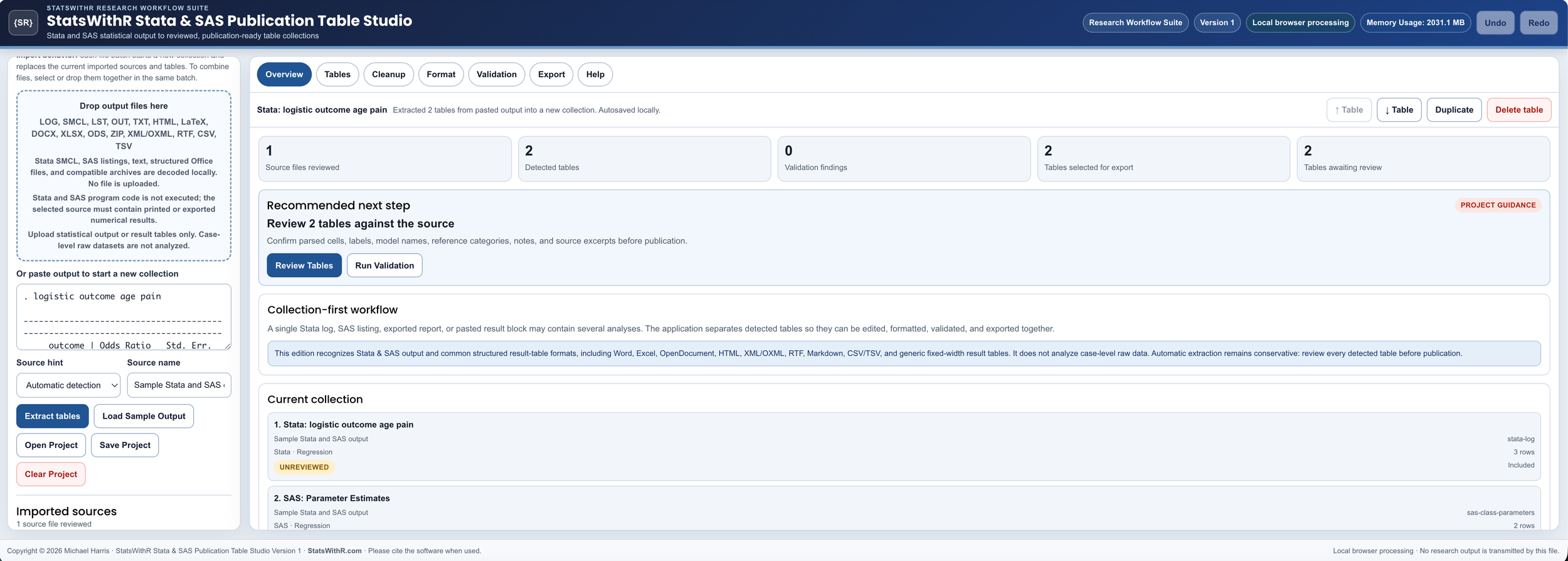
Stata & SAS Publication Table Studio
Prepare tables from Stata logs, SAS listings, reporting output, and structured exports.
Common sources include:
Stata .log and .smcl output
Copied Stata etable and dtable results
Survey and post-estimation tables
Regression, survival, meta-analysis, and model-fit output
SAS listing output
SAS ODS-derived HTML, XML, Word, Excel, and RTF tables
Compatible text, CSV, TSV, OpenDocument, and ZIP result collections
SPSS & Point-and-Click Publication Table Studio
Prepare publication tables from SPSS and other menu-driven statistical applications.
Common sources include:
Compatible SPSS Viewer packages
SPSS OXML and XML
Exported HTML and copied pivot-table output
Compatible jamovi and JASP result packages
JMP reports
Minitab session output
Compatible Word, Excel, OpenDocument, HTML, RTF, CSV, TSV, text, and ZIP result collections
Included Features
Detect multiple tables within one report or output file
Edit titles, subtitles, model labels, headers, rows, cells, and notes
Add, delete, duplicate, reorder, or restructure tables
Undo and redo editing actions
Apply safe cleanup suggestions
Standardize statistical labels
Combine compatible model tables
Validate table structure and statistical ranges
Export review and provenance documentation
Process statistical output locally in the browser
The StatsWithR Statistical Software Membership provides access to browser-based applications for REDCap dictionary review, research-data quality management, causal-diagram planning, publication-figure creation, and publication-table preparation. Membership includes all current paid applications, newly released paid applications, and ongoing software improvements while access remains active.
Compatibility depends on the statistical-software version, procedure, export method, and degree of output customization. Password-protected, encrypted, damaged, or unsupported proprietary structures may not import correctly. Users must compare all extracted tables with the original statistical output and remain responsible for the statistical accuracy and appropriateness of the final publication tables.
Product and software names are used only to identify compatible output sources. StatsWithR and the Publication Table Studios are independent of the developers of the referenced statistical software.